Posting Data
- Describe a situation when you would use a POST request
- Use `request` to send a POST request to an API using Python
Pre-work
Setup
If nobody has already, copy and paste this command into Slack
/prework POST Requests
Recap
In today's workshop we'll be learning about how to create a POST request to send data to an API. As a quick recap, try to recall what each of the following HTTP Methods should be used for.
Write a sentence for each of the methods below explaining what they are for:
- GET
- POST
- PUT
- DELETE
- PATCH
- HEAD
Review
We'll be using this API in today's workshop. Familiarise yourself with the endpoints that make up the following API:
Predict
Consider the below snippet of code.
payload = {
  "order_id": 12345,
  "status": "paid"
}

res = requests.post("https://api.example.com/update-order",
                    json=payload)
Answer the following questions:
- In practical terms, what does this code do?
- What would you expect
resto contain? - What would be the expected effect on the server of running this code?
Workshop
Setup before the workshop starts ensure that the Microblogging API is up and running. This is hosted on Heroku. Speak to Chris or Dan to launch it.
Elicit questions from trainees about the prework.
Explain that up until this point we've only been requesting data from the internet but when we use the internet (e.g. to book a hotel, to order food, to send a message to a friend) we need to ask be able to send information as well
Explain the different parts of a HTTP Request:
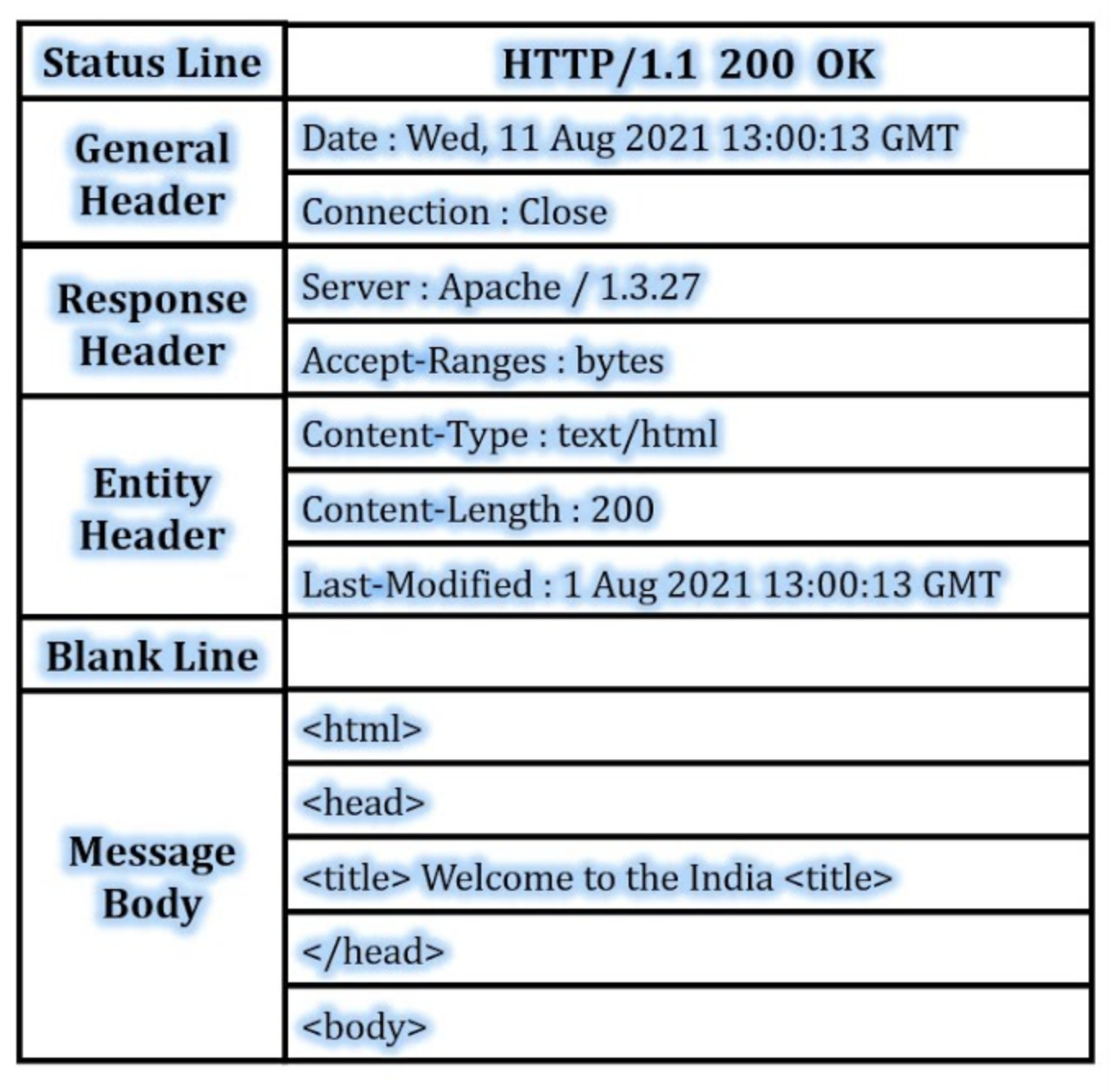
Demonstrate using the Network Tab on Chrome how you can see this information in real time when we visit websites. Demonstrate how we can see:
- Request URL: The URL of the website we are visiting
- Request Method: The HTTP Method we are using
- Status Code: The response from the server
- Remote Address: The IP address of the server we are visiting
- Request Headers: The information we are sending to the server etc
Explain that we can use the requests library in Python to send this information to a server.
Introduce the Microblogging API that we will be using in this workshop.
Live code using the Microblogging API send and receive messages.
Walk the trainees through how to make a POST request to the server.
import requests

def send_message(message: str) -> None:
    response = requests.post(
        "https://tools.sigmalabs.co.uk/api/microblogs/SigmaStudent99",
        json={"message": message, "from": "SigmaStudent99"},
    )


def get_microblogs() -> dict:
    response = requests.get(
        "https://tools.sigmalabs.co.uk/api/microblogs",
    )
    json = response.json()
    return json


print(get_microblogs())
sendMessage("My message")
print(get_microblogs())
Give the trainees the following task
In pairs, you should add functionality that will let the user
- Ask the user for their name and set it
- Get the microblogs only for that username
- Post a message as that username
If the trainees finish this task they should then
- Add a loop so they can keep on posting new messages
- Implement the DELETE endpoint so they can delete messages
- Implement the PATCH endpoint so they can update messages that have already been posted